Creating a custom calendar is one of the easiest ways to personalize your home, office desk, classroom, or digital devices. Whether you want a photo calendar, a branded corporate calendar, or a family event planner, you no longer need Photoshop or expensive design tools.
With modern online tools like the Custom Calendar Creator from ToolsOnlineHub, you can generate a stunning, printable, and downloadable calendar in a few clicks.
In this guide, I’ll walk you through:
- How to make your own calendar for free
- How the online custom calendar tool works
- How to upload your image and choose templates
- How to download or print your personalized calendar
- Best use cases and creative ideas
This guide is ideal for anyone looking for a free printable calendar, a custom design, or a quick calendar download for any year.
Why Create a Custom Calendar?
People use custom calendars for:
- Personal desk calendars
- Home decoration
- Gift items
- Corporate branding
- Event planning
- School projects
- Social media content
- Vision boards
A custom calendar is more meaningful because it includes:
- Your own photos
- Your preferred style
- Custom layout
- Your chosen year
- Beautiful templates
And the best part — you can make your own calendar free without professional design skills.
Step-by-Step: How to Create a Custom Calendar Online
The tool on your website provides a smooth and smart flow for generating a personalized calendar.
Here is a clear, simplified guide.
1. Enter the Year
On the homepage of the Calendar Tool, you’ll see a field to enter the desired year.
Steps:
- Type the year you want (e.g., 1999, 2025, 2026, 2030).
- Click Generate.
Once the year is submitted, the tool automatically unlocks the next step: Template Selection.
2. Choose Your Calendar Template
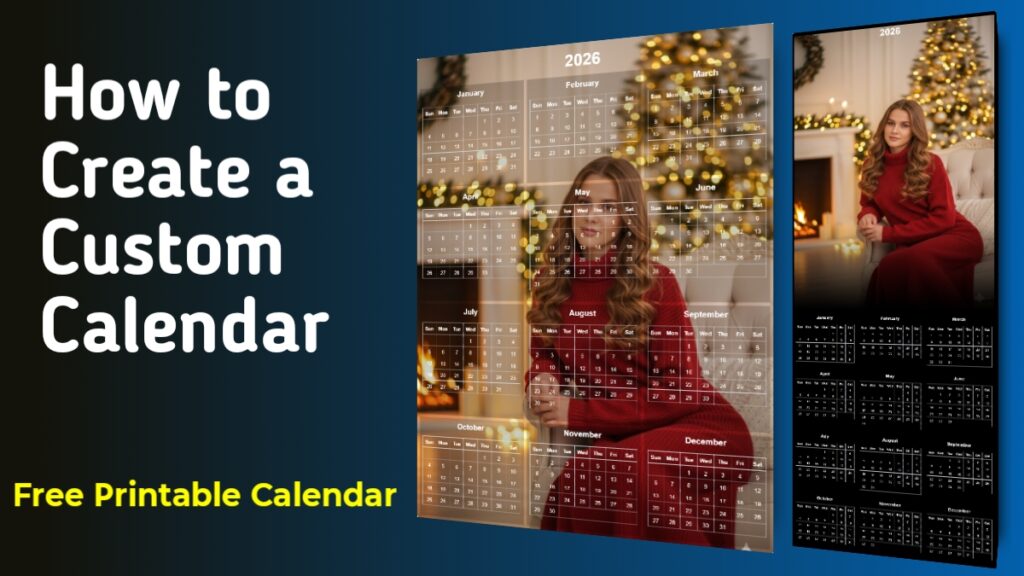
The tool offers two professionally designed templates:
Template 1:
- Full-page background image
- 3×4 calendar grid
- Clean, modern layout
- Best for photo calendars
Template 2:
- Elegant dark theme
- Header image layout
- Ideal for corporate or minimalist designs
Click the template you want to use.
3. Upload Your Background Image
This is where the personalization begins.
You can upload:
- Your photo
- A landscape
- A family picture
- Business branding
- Festival theme
- Travel photos
- Pet photos
The tool accepts any image file (JPG, PNG, etc.).
Once uploaded, click Apply Image.
Both templates will automatically embed the selected image:
- Template 1 sets it as the full background
- Template 2 places it in a styled header area with a smooth gradient overlay
4. Preview Your Custom Calendar
After applying your image, the full calendar is generated instantly.
You will see:
- Year displayed prominently
- All 12 months arranged neatly
- Clean typography
- Color-coordinated text
- Professional alignment
- Auto-adjusted day numbers and leap-year calculation
The tool intelligently calculates:
- Start day of every month
- Leap year adjustments
- Number of blank cells
- Week structure (Sun–Sat)
This gives you a pixel-perfect custom calendar, ready to download or print.
5. Download or Print Your Calendar
Once the calendar appears, two buttons become visible:
- Prints the calendar cleanly with a printer-friendly layout.
- Generates a high-quality PNG file.
- You can save this file for:
- Framing
- Gifting
- Office desk
- Digital wall
- Sharing on social media
This makes the tool a perfect solution to make your own calendar free.
Key Features of the Custom Calendar Tool
Your tool offers powerful capabilities:
- ✓ Free printable calendar – no watermark, no charges.
- ✓ Fully customizable – Upload your own image and select your preferred template.
- ✓ Auto-generate for any year – Past, present, or future calendars.
- ✓ Easy to Download & Print – Single-click export.
- ✓ Professional layout – Clean and visually appealing grid.
Creative Ideas for Your Custom Calendar
Here’s how users can get creative:
- Family Photo Calendar – Use monthly pictures of your kids or family.
- Travel Memories Calendar – Perfect for your travel highlights.
- Business Branding Calendar – Add your logo and create corporate giveaways.
- Personalized Gift Calendar – A meaningful birthday, anniversary, or festival gift.
- Vision Board Calendar – Add motivational quotes, goals, and affirmations.
- Pet Calendar – Use pictures of your dog, cat, or pet bird.
Benefits of Using an Online Custom Calendar Maker
- Fast & Easy – No design skills needed.
- 100% Free – Unlike premium online tools (Canva, Adobe, etc.).
- Instant Preview – See your design in real-time.
- High-Quality Output – Sharp and clean printable version.
- Accessible Anywhere – Works on PC, tablet, or phone.
Frequently Asked Questions (FAQ)
1. Can I make a custom calendar for free?
Yes. ToolsOnlineHub allows you to create your own calendar free with downloadable high-quality output.
2. Can I upload my own photos?
Absolutely. Upload any image and it will instantly apply to your chosen template.
3. Is the calendar printable?
Yes. It includes a print-optimized mode for clean printing.
4. Does it work for any year?
You can generate calendars for past, current, or future years.
5. What formats can I download?
You can download the calendar in PNG format, suitable for printing and sharing.
Conclusion
If you’re looking to make your own calendar free, personalize it with photos, and download a free printable calendar, this tool is one of the most efficient options available. You don’t need design software or technical skills—just upload an image, choose a template, and print or download your custom calendar within seconds.
Start here:
👉 Create Your Custom Calendar Now – ToolsOnlineHub Calendar Maker